

0signer
A DSC auto signer that actually signs — no hidden PIN prompt, no file-by-file clicking.
(01) The challenge
Signing PDFs with a hardware USB DSC token one file at a time is slow — and the usual automation runs as a Windows Service, where the token's PIN dialog can never appear, so signing just hangs.
(02) The approach
0signer watches folders and signs every PDF dropped in. It uses silent PKCS#11 signing for tokens like the HyperPKI HYP2003 (a Feitian ePass2003 rebrand), with a CSP fallback, and runs as a Scheduled Task inside the logged-in Windows session so the token can accept its PIN — all controlled from the system tray.
(03) What we shipped
Bulk Auto-Signing
Drop PDFs into a watched folder and they're signed automatically with your DSC.
Multiple Signing Profiles
Several DSCs and input/output folder pairs side by side — one per department or signatory.
Hardware DSC Token Support
HyperPKI HYP2003 / Feitian ePass2003 via silent PKCS#11 signing.
Visible Signature Placement
Align and style exactly where the visible signature stamp appears.
Merge & Split PDFs
Built-in tools to merge PDFs together or split one apart, from the tray.
Signing Reports
Signing activity and status from the tray, plus a log file for troubleshooting.
(04) Inside the product
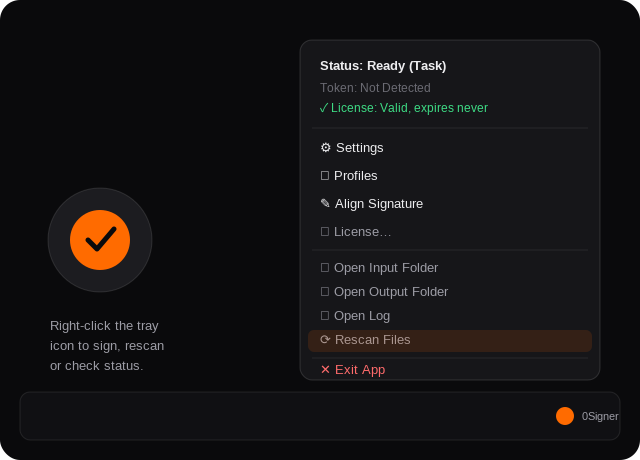
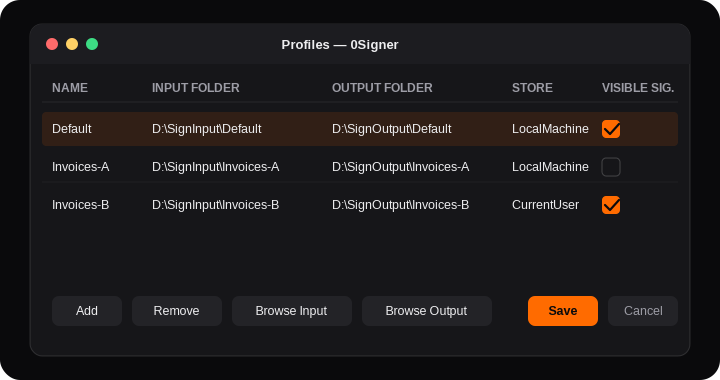
UI mock-ups reflect the real tray app's layout and functionality.
Let’s build yours.
Tell us what you're building. We'll come back with a plan, a timeline and a free quote.
project